

Choosing a smart locket involves more than selecting an attractive pendant. Because it contains a display, battery, electronic storage and app-connected features, it should be evaluated as both jewelry and a compact digital device.
The most important questions are practical: How many memories can it hold? Can it display video? Does it need a phone nearby? How often must it be charged? Where are personal photographs stored?
Use the following ten criteria to compare smart lockets before buying.
Check the Actual Memory Capacity
“Supports multiple memories” is too vague to help with a purchasing decision. Look for an exact number of photos, videos or animations.
Also confirm whether different formats can be stored together. A product may support several formats without allowing them to remain on the device simultaneously.
For example, the current Tree of Life AI Smart Locket offers three alternative memory modes:
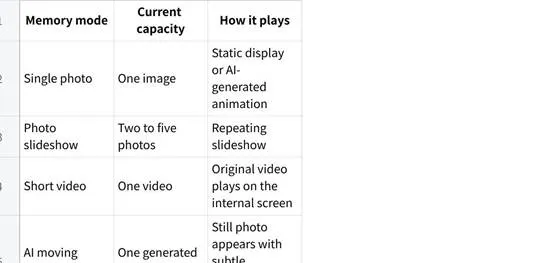
The locket does not function as a large gallery containing five photos, a video and an AI memory at the same time. Choosing a new mode replaces the content currently stored on the device.
Before buying another model, ask:
• What is the maximum number of files?
• Are the limits based on file count or total storage?
• Can photos and videos be stored together?
• Does uploading new content replace the existing content?
Review the Supported Photo, Video and AI Formats
A smart locket should clearly explain what kind of media it accepts.
Photo Support
Check whether the locket displays:
• One static photograph
• Multiple photos as a slideshow
• Portrait and landscape images
• Cropped or automatically resized images
• Animated versions of still photographs
A small pendant screen cannot display every photograph clearly. Wide group pictures may make faces too small to recognize, while a close portrait with one central subject will usually be easier to view.
The supporting app should provide a cropping guide or preview so the user can see how the image will appear before transferring it.
Video Support
“Video support” should include an exact duration and file-size limit.
The current Tree of Life model accepts one video of up to five seconds and under 7 MB. That is enough for a brief visual moment, such as a pet greeting its owner or family members waving, but not a full message or extended recording.
Do not assume that video playback includes clear audio unless the product specifications state it.
AI Memory Support
An AI moving memory uses a still photograph to create subtle generated motion. It is not a restored recording or an exact reconstruction of the photographed moment.
The current Totwoo listing includes ten AI memory creations. Previously generated animations can be reused from the app’s local history without using another creation.
AI animation may be appropriate for a positive family or pet photograph. For bereavement and memorial gifts, confirm that the recipient is comfortable with generated movement before using this feature.
Find Out Where the Memories Are Displayed
Not every product described as a digital or smart locket contains an internal screen.
Some pendants use NFC or a QR code to open content on a phone. In that case, the memory is associated with the jewelry but is not displayed inside it.
A screen-based smart locket contains an electronic display within the pendant. The wearer opens or activates the locket to see the content directly.
With the Tree of Life model:
• Opening the pendant activates the internal screen.
• A photo, slideshow, video or AI memory plays automatically.
• A touch point beneath the display moves to the next photograph.
• The same touch point can replay a video.
• Tapping the control wakes the screen after it switches off.
Before purchasing, confirm whether the content appears:
• Inside the locket
• On a connected phone
• On a webpage
• Through a combination of the pendant and phone
Product photographs should show the actual display rather than only the exterior jewelry design.
Confirm Phone and App Compatibility
Most smart lockets require an app for setup, content transfer and future updates.
Check:
• Whether the app supports iOS, Android or both
• The minimum operating-system version
• Whether an account is required
• Which app permissions are needed
• Whether Bluetooth must remain enabled
• Whether the app is available in the recipient’s country
• Whether more than one person can manage the locket
• What happens if the user changes phones
The current Totwoo setup process supports iOS and Android phones. It requires the Totwoo App, account sign-in and Bluetooth for connecting the pendant.
Do not assume that “iOS and Android compatible” means every phone model or operating-system version will work. Check the current app listing before ordering, particularly when the recipient uses an older device.
Separate Internet Requirements From Bluetooth Requirements
Internet access, Bluetooth transfer and offline playback are three separate considerations.
Internet Access
An internet connection may be needed to:
• Download the app
• Create or sign in to an account
• Access software updates
• Generate AI content
• Submit preloaded gift content
Bluetooth Connection
Bluetooth is commonly used to transfer the prepared media from the phone to the pendant. During transfer, the phone should remain close to the locket with Bluetooth enabled.
The current Totwoo instructions recommend keeping the locket open, remaining on the transfer page and maintaining at least 20% battery until the process is complete.
Offline Playback
After content has been transferred to the Tree of Life locket, it is stored locally on the device. Normal playback does not require the phone to remain nearby or maintain a continuous Bluetooth connection.
Before buying another smart locket, confirm whether it stores media locally or retrieves it from an online service each time it is viewed. Local playback is more convenient when traveling or using the locket in places with unreliable internet access.
Compare Battery Life and Charging Requirements
Battery information should include more than a vague claim such as “long-lasting.”
Look for:
• Estimated standby time
• Number of views per charge
• Typical charging time
• Charging-cable type
• Replacement-cable availability
• Battery warranty
• Whether the battery can be serviced or replaced
The current Tree of Life specifications list:
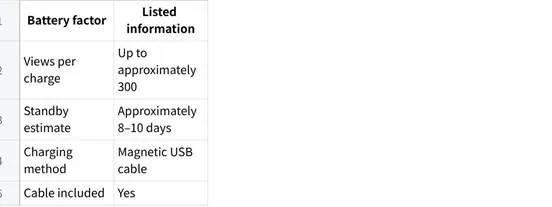
Actual performance will depend on how often the screen is opened, the selected media format and charging habits. Frequent video playback may use more power than occasionally viewing one photograph.
Because the locket uses a magnetic charging cable, consider where a replacement can be obtained if the original is lost.
Someone who wants jewelry that never requires charging may be happier with a traditional photo locket.
Check Pendant Size, Weight, Chain and Materials
Product photographs can make a digital pendant appear smaller or lighter than it is. Always review measurements before buying.
The current Tree of Life model lists:
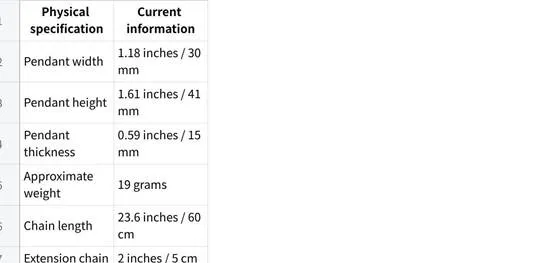
A 15 mm-thick electronic locket will feel more substantial than a thin traditional pendant. Someone who wears bold jewelry may appreciate that presence, while a person who prefers delicate necklaces may find it too large.
Material Options
The current product is offered in several constructions:
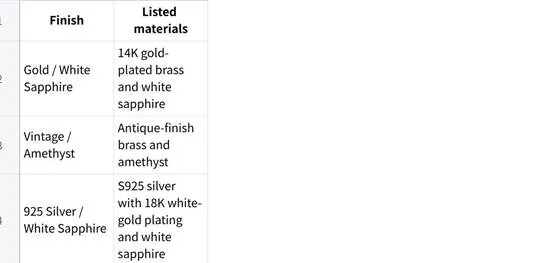
Do not assume that plated jewelry is hypoallergenic. If the recipient has known metal sensitivities, ask the manufacturer about the complete material composition, including any nickel content, before purchasing.
Also review:
• Water-resistance guidance
• Cleaning instructions
• Exposure to perfume and cosmetics
• Storage recommendations
• Whether the pendant should be removed for exercise or bathing
Electronics make care requirements more important than they are for ordinary jewelry.
Understand Where Personal Content Is Stored
A smart locket may contain private family, relationship, pet or memorial images. Its privacy design therefore matters.
Before uploading content, determine:
• Whether media is stored on the pendant
• Whether copies remain in the app
• Whether files are uploaded to cloud storage
• Whether AI processing sends images to an external service
• Who can access the associated account
• How content can be deleted
• What happens when the locket changes owners
• Whether factory-reset instructions are available
According to the current Totwoo setup guide, transferred photos, videos and animations are stored on the locket. Content history is also kept locally in the uploader’s app rather than being placed in a public gallery.
When the recipient connects the locket to a new account and transfers new content, the previous media on the device is replaced.
AI-generated content may involve additional processing beyond an ordinary Bluetooth transfer. Review the current privacy policy before using sensitive photographs of children, private family moments or people who have died.
Check How Content Is Updated and Preloaded
Updateability is one of the main differences between a smart locket and a printed photo locket.
Confirm whether the user can:
• Replace one photograph
• Change the entire slideshow
• Switch between photo and video modes
• Reuse previous content
• Download or save app history
• Transfer content from a new phone
• Reset the device before giving it to someone else
With the current Tree of Life model, users can select different media in the app and transfer it to the pendant. The new selection replaces the content already stored on the locket.
Preloading Before Gifting
A smart locket should ideally be prepared before the recipient opens it.
The buyer can:
Receive the locket first.
Charge and connect it.
Add the selected memories.
Test the display.
Recharge and package it.
Totwoo also currently provides a “Customize Locket” option for buyers arranging direct delivery. Check the latest instructions and submission deadlines before relying on this service.
Preloading is useful, but the recipient should also receive the charger, setup instructions and information needed to control or replace the content later.
Review Warranty, Returns and Software Support
Electronic jewelry has more possible failure points than traditional jewelry. The warranty should address the pendant as a device, not merely its chain or decorative finish.
Review:
• Warranty length
• Coverage for the battery and display
• Exclusions for water or impact damage
• Return period
• Whether personalized products remain returnable
• Who pays return shipping
• Repair availability
• Replacement charging cables
• App support
• Firmware or software updates
• Customer support contact methods
The current Tree of Life product listing states a one-year warranty for manufacturing defects and 30-day free returns on eligible purchases. Buyers should review the complete terms to understand exclusions and whether preloaded or customized orders qualify.
Test the locket soon after delivery. Confirm that it:
• Charges correctly
• Connects to the app
• Accepts a media transfer
• Plays each selected file
• Responds to the touch control
• Retains the content after disconnection
• Includes all listed accessories
Waiting until the gift date could place the purchase outside part of the return or support period.
A Practical Smart-Locket Comparison Template
Use this table when comparing products:
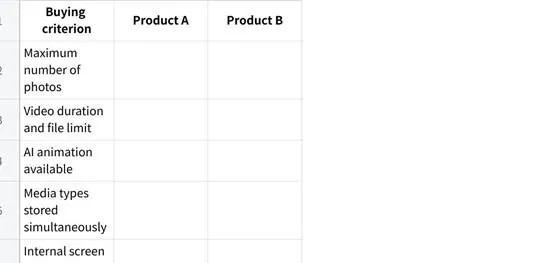
If a product page does not answer several of these questions, contact customer support before ordering.
When Not to Choose a Smart Locket
A smart locket may not be the right product when the recipient:
• Rarely wears necklaces
• Prefers very small or lightweight pendants
• Does not want to install an app
• Uses an incompatible phone
• Wants no digital storage of personal photographs
• Does not want jewelry that requires charging
• Expects decades of use without software dependency
• Would prefer one permanent printed photograph
• Is uncomfortable with AI-generated images
In these cases, a traditional photo locket may provide a better ownership experience with fewer maintenance requirements.
Choose the Specifications Before the Symbolism
A Tree of Life design may suggest family, growth or continuity, but symbolism should not replace practical product evaluation.
First confirm the locket’s capacity, formats, display, phone compatibility, connection method, battery life, materials, dimensions, privacy design and warranty. Then decide whether its exterior design fits the recipient.
A suitable smart locket is one the recipient can comfortably wear, operate and maintain. The memories make it personal, but the specifications determine whether it will continue to be used.
